Introduction
A “location-based run” in domiciliary care is defined as a structured and organized schedule that groups a series of recurring client visits into a logical sequence based on their geographical proximity, allowing a care professional to follow it during their shift.
The process of creating runs can vary from one business to another. Factors such as the characteristics of the service area (e.g., urban or rural), number of clients, size of the local market, and access to new clients can all impact a business’s ability to create, manage, and sustain location-based runs.
In this blog, we’ll cover the 6 steps home care providers can follow to build new runs or to optimize their existing runs.
Step 1: Zoning
The first step in creating runs is to divide your service area into smaller, well-defined zones. Start by focusing on your current service area, while also considering potential future expansion.
When creating zones, take the following factors into account:
- Natural Boundaries: Use geographical features like cities, towns, neighbourhoods, villages, or major streets to create zones that are easily identifiable and navigable.
- Administrative Boundaries: Align zones with local administrative borders (e.g., districts, Parish or town councils).
- Topography: Consider physical barriers such as rivers, lakes, mountains, national parks, or highways that may impact travel time and the practicality of navigating within a zone.
- Road Networks: Ensure each zone has good road access and reliable transportation routes to minimize delays and disruptions in care delivery.
The goal is to create zones that can be named, with each zone assigned a unique colour for easy identification (see fig. 1). For instance, if your service area primarily covers the BCP council area, you might divide it into three zones: Bournemouth, Christchurch, and Poole, assigning each zone a different colour. In Runwiz this is a basic setting which enables and simplifies managing runs later on.
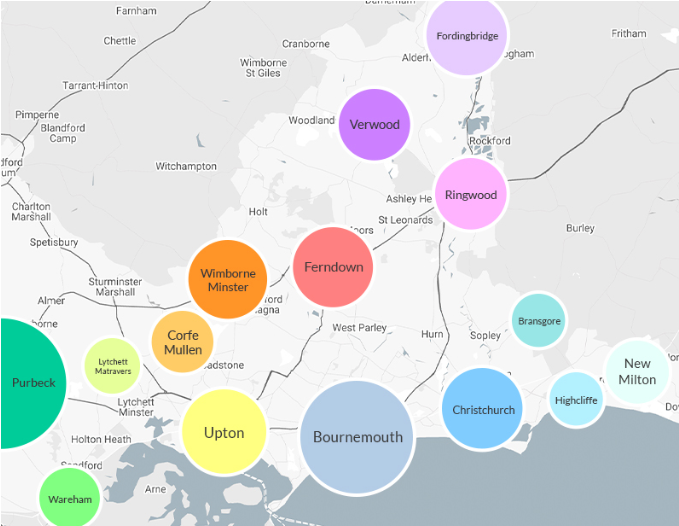
Fig. 1
Step 2: Clustering
Clustering involves organizing clients into groups based on their similarities. In this case, it refers to creating clusters of clients based on their location.
To achieve this, you need to map out where your clients are located. If you use rostering software with a mapping feature, such as Runwiz, this task becomes straightforward. If not, a wall map and pins will suffice. This process helps identify groups of clients, as well as any remote ones, providing a clear view of natural geographic clusters (see fig. 2). These clusters will help you to create your first location-based runs.
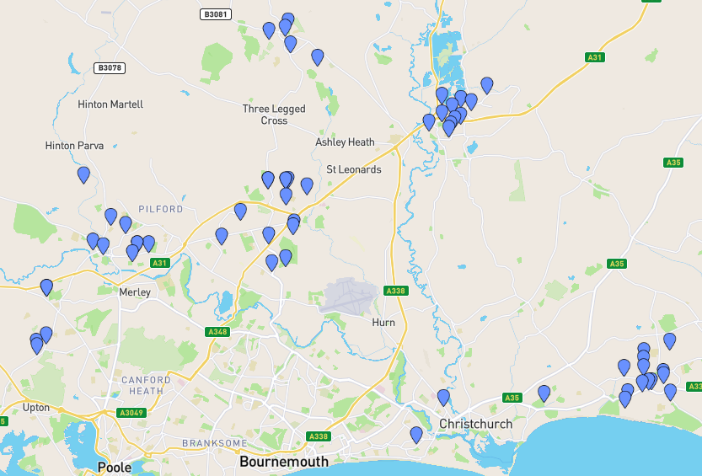
Fig. 2
With zones already created, you can now identify which clusters of clients “belong” to each zone. Recording each client's zone (as defined by your service area) in the rostering system is essential, alongside their addresses. This helps to allocate clients to the appropriate runs. In Runwiz, all clients are assigned to color-coded zones, making scheduling and rota management simple and organized, even before formal runs are set. This color-coding feature also helps to quickly spot inefficiencies, like instances where a care professional’s route crosses multiple, distant zones during their shift (see fig. 3) —a mistake that is easily corrected when visits are color-coded.

Fig. 3
The goal of this stage is to group all your clients into clusters based on their location and assign them to the relevant zones. Once this is complete, you’ll be ready to start creating runs.
Step 3: Visit Times, Durations and Frequency
A well-built and optimized run should represent an ideal shift for the care professional, maximizing client contact time, providing sufficient travel time, and minimizing idle periods.
Typically, care professionals' day shifts are divided into two parts: morning and evening. The morning shift generally begins at around 7:00 AM and ends by 2:00 PM, while the evening shift runs from 4:00 PM to 10:00 PM. These timings align with the needs of service users, who commonly require assistance at morning, lunch, teatime, and bedtime.
As a result, any run will need to fit within these time parameters and can be divided into four distinct time slots:
- Morning: 7:00 AM – 11:00 AM
- Lunch: 11:00 AM – 2:00 PM
- Teatime: 4:00 PM – 7:00 PM
- Bedtime: 7:00 PM – 10:00 PM
At this stage, you’ve already identified clusters of clients within each zone. To build a run, each care package will now need to be examined in terms of visit frequency, timing, and duration. Start with larger, more regular care packages (e.g., clients needing four 30-minute visits daily). Ideally, you should be able to group at least four clients with such packages into a single run, minimizing travel time between each visit. Aim to keep travel time to no more than 10 minutes between clients, maximizing each time slot by fitting in as many visits as possible while avoiding unnecessary gaps.
Regularly review a map of the run to identify the shortest travel distances between visits, which will help determine the optimal visit order (assuming no specific time preferences for the clients). Using mapping tools or GPS systems will enable you to plot the most efficient route between clients. Rostering systems with interactive maps, like Runwiz, will simplify this task.
As you populate each run with visits, accounting for travel time, potential gaps in the time slots will become apparent. These gaps can now be filled with smaller packages (e.g., clients requiring one or two visits daily). If there are no additional clients in the area, these gaps indicate your capacity within that zone, which can be used for future clients.
The goal is to establish a predictable, templated schedule, prioritizing regular, preferably daily, visits. Irregular visits (e.g., once or twice per week) can be added later or managed separately through manual allocation, though minimizing visits outside the runs reduces the need for manual scheduling.
By the end of this step, most client visits should be grouped into location-based runs within each zone, optimized to minimize travel time between visits. Each run should be filled to capacity (see fig. 4). If this isn't possible at this stage, you will at least have a clear view of remaining capacity for potential new clients in that area (see fig. 5).

Fig. 4

Fig. 5
If your rostering system supports color-coding for zones and client locations, all visits should be color-coded accordingly. Multiple runs within the same zone would share the same colour. This feature, available in Runwiz, allows operators to quickly identify scheduling errors, such as visits crossing runs in daily rotas. Color-coding also helps when run merging is required, making it easy to see which runs can be effectively combined and which should remain separate due to travel distances. Additionally, color-coded runs are easier for new care coordinators to learn, reducing training time for rota management.
Step 4: Client Needs and Preferences
Location-based runs form the basis for streamlining scheduling processes and creating operational efficiencies. Once this service organization is in place, it's essential to consider additional critical factors—such as client needs and personal preferences—to ensure the delivery of truly person-cantered care.
These elements should be thoughtfully incorporated into the run creation process to maintain quality care. Below are some key additional factors to consider when designing effective care runs:
Complex Care Needs
Some clients require specialized, complex care, such as stoma care, catheter care, or PEG feeding, which only certain care professionals are trained to provide. If you identify clients with these needs, it’s often best to create a separate run dedicated to complex care. This allows you to assign the appropriate care professionals to runs where their skills and expertise is most needed.
Creating a separate run is especially useful when your pool of trained care professionals is small, as it focuses on optimizing the utilization of specialized staff rather than prioritizing client location. However, if your organisation specialises in complex care and most of your staff are trained in these services, client location can again become the priority when creating runs. In this case, clients with higher needs can be mixed with those requiring less complex care, as all care professionals will have the skills and knowledge to meet the needs of both groups effectively.
Gender Preferences
Certain clients may request care professionals of a specific gender, particularly for personal care tasks. For example, female-only visits are common especially in the morning and bedtime. When planning runs, just one client’s gender preference can convert the entire run into a female-only. Therefore, it’s important to assess your capacity in each location to cover these types of runs. You might need to attract more female carers locally or reallocate employed ones from other locations.
If a sustainable female-only run can be established in a specific area, it can open the door to serving more clients with similar preferences. However, if your capacity is limited or changes (e.g., due to the loss of female carers), you may find yourself unable to meet these preferences, which could ultimately force you to hand back care packages. This needs to be assessed on an ongoing basis.
Double-Up Visits (D-Up)
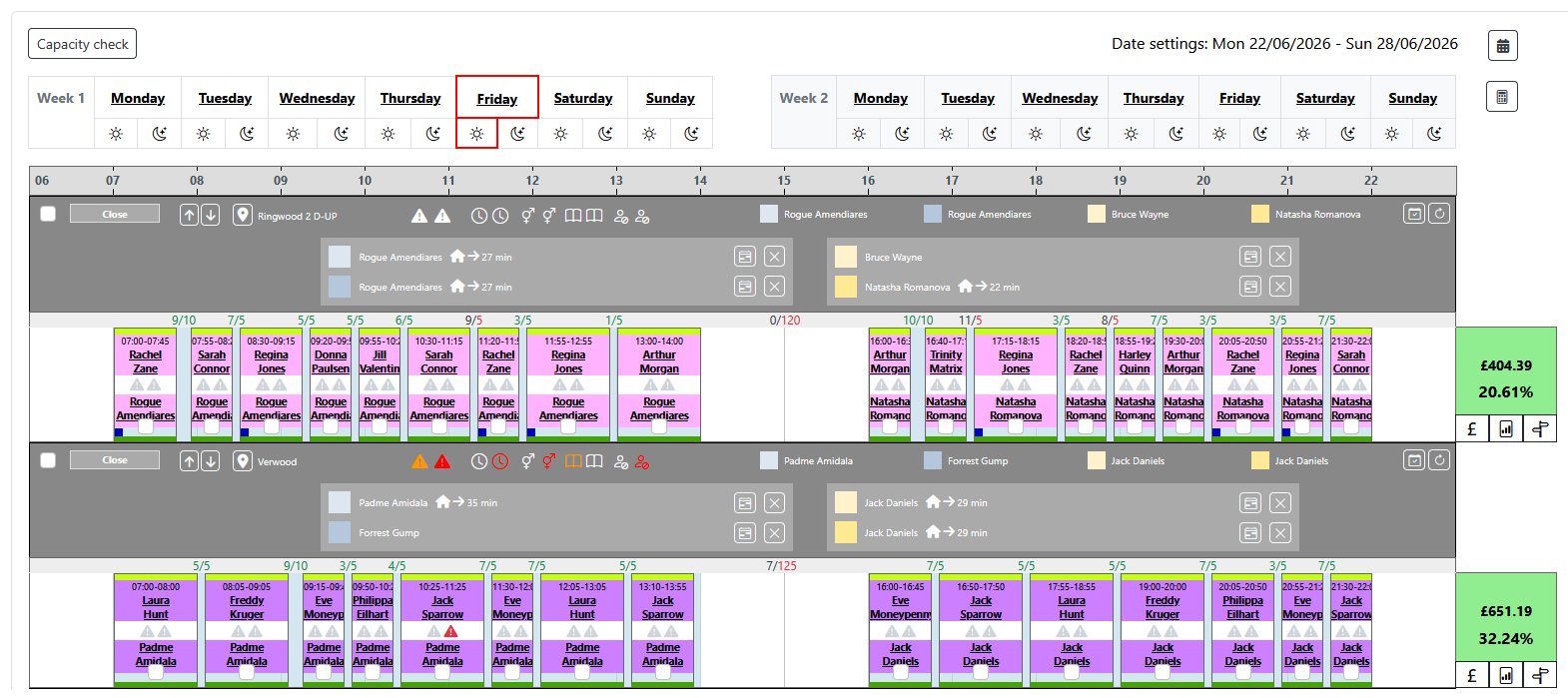
Some clients require two care professionals for tasks such as safe transfers or managing challenging behaviours, leading to "Double-Up" (D-Up) visits. These visits should ideally be linked within the rostering system to ensure both caregivers arrive at the same location at the same time, making precise scheduling essential.
Runwiz’s D-Up functionality simplifies this process by linking these visits, allowing adjustments to one visit to be mirrored in the other, ensuring perfect synchronization. Additionally, you can schedule D-Up visits of varying durations, enabling two caregivers to complete shared tasks together, while one may continue with additional duties independently.
From a scheduling perspective, D-Up visits must be allocated across two separate runs in one zone. Therefore, when creating D-Up runs, it’s crucial to ensure adequate staffing capacity and a sufficient client base. Ideally, both runs should be fully utilized—not just with additional D-Up visits, but also with single visits, to maximize capacity and ensure efficient use of staff availability.
Time-Specific Visits
Many clients have specific preferences regarding when they receive care, whether based on their personal routines, medical requirements, or care needs. When building runs, it’s crucial to accommodate these time preferences to ensure that clients receive care when they need it most.
However, balancing these preferences with operational efficiency can be challenging. Time-specific visits often limit the flexibility of runs, as they can restrict the ability to optimize the order of visits, particularly when factoring in geographical proximity or other logistical considerations. For example, it may not be possible to optimize the route from Client A to B to C if Client C requires an earlier visit than Client B. In this case, the flow of the run is disrupted, leading to longer travel times and less efficient routes. While this can sometimes be unavoidable, managing these situations thoughtfully is key to maintaining both service quality and efficiency.
In Runwiz, time-specific visits are clearly marked, enabling care coordinators to quickly identify clients with time preferences. This feature streamlines the scheduling process by allowing care managers to prioritize time-specific needs while still aiming to optimize the overall efficiency of the run. By clearly displaying these visits, Runwiz helps care managers make informed decisions, balancing the importance of client preferences with the need for operational efficiency.
To effectively manage time-specific visits, consider the following strategies:
- When creating runs, prioritize time-specific visits based on client medical or care needs, ensuring these essential visits are scheduled first. This will allow the rest of the run to be built around these appointments.
- Maintain open communication with clients regarding their time preferences. Manage their expectations—not all morning visits can be scheduled for exactly 9:00 am. By making clients aware of potential schedule adjustments, you can help them understand and accommodate changes that meet both their needs and operational requirements.
Step 5: Assigning Care Professionals
Now comes the next crucial step: assigning a small group of care professionals to each run. This process requires careful consideration to ensure the right group of carers is matched with the right run, maximizing both care quality and staff satisfaction.
Key factors to consider when assigning care professionals include:
- Availability: Align the care professional’s availability with the time requirements of each run. In home care, ensuring consistent coverage from 7:00 am to 10:00 pm daily across all locations is critical. Therefore, you should evaluate your workforce's availability to ensure all runs are fully covered. Identify areas where staff availability is sufficient and where you may need to recruit additional care professionals. The goal is to allocate as few care professionals to each run as possible to maintain continuity of care, which improves care quality and client-carer relationships. With Runwiz’s built-in availability templates, you need as few as two full-time care professionals to cover an entire run efficiently.
- Gender: If a run includes clients with gender-specific preferences, ensure the assigned care professionals meet these requirements.
- Skillset and Qualifications: Some runs may include clients with complex care needs. When analysing runs, you should check that your team’s training and competencies meet these requirements. If knowledge and skillset gaps exist, additional training or recruitment may be necessary to meet the demand for specialized care.
- Care Professional Preferences: Where possible, consider your care professionals' preferences, such as their desired working locations, commute times, or comfort levels with specific care tasks. For example, some care professionals may prefer more fast-paced runs, while others might prefer runs with less intense workloads. By aligning runs with their preferences, you can create a positive work environment, reduce burnout, and lower turnover rates.
- Familiarity with the Area: Assign care professionals to runs in zones they are familiar with to reduce travel times, improve efficiency, and lower stress levels associated with navigating unfamiliar locations. When carers know their zones well, they are more confident and comfortable, contributing to overall job satisfaction and smoother operations.
By carefully assigning care professionals to runs based on these factors, you ensure high-quality care for clients while boosting staff satisfaction, retention, and operational efficiency.
Step 6: Ongoing Optimization
If you’ve reached this stage, congratulations! You’ve successfully organized all (or most) of your client visits into location-based runs that accommodate client needs and preferences. By doing so, you’ve created defined and predictable patterns, allowing you to assign a small group of care professionals to each run who meet the specific requirements. Ideally, most—if not all—of your runs are now covered, and you no longer have to worry about scheduling and rotas anymore! If only it was that easy!
In home care, everything is subject to change. Your carefully crafted runs will inevitably be impacted by:
- Clients or care professionals relocating
- Changes in clients' care needs and preferences
- Changes in care professionals' availability and preferences
- Adjustments in visit times, durations, and frequency
- Clients leaving the service or new clients joining
- Care professionals leaving or new ones joining
This is why regular optimization of runs is crucial for maintaining their quality and effectiveness. While this may seem daunting, with the right tools, it doesn’t have to be. In fact, optimizing runs should not take longer than one hour on a weekly basis.
Here’s where Runwiz offers a significant advantage over other rostering systems: the dedicated run optimization tool, Run Wizard. Run Wizard is a comprehensive run management and service planning tool that displays all client visits organized into runs alongside care professional availability on a single screen, streamlining efficient planning and optimization before rotas are published.
To ensure runs consistently reflect changes for both clients and staff, it’s essential to keep their records up to date. Here are key steps for effective run optimization:
- Keeping Client Records Up to Date: Ensure all client profiles accurately reflect any recent changes, including care needs, preferences, locations, visit times, durations, and frequencies. This includes setting up profiles for new clients and closing profiles for those who are no longer active.
- Keeping Staff Records Up to Date: Maintain updated staff profiles, reflecting changes in availability, preferences, locations, training, and qualifications. This includes creating profiles for new staff and closing profiles for those who have left.
With regular record management, you’ll clearly see how individual updates impact runs—and ultimately clients and staff—before rotas are published. The Runwiz system provides visual feedback to highlight potential issues, such as:
- Visit Overlaps: Instances where two or more visits are scheduled simultaneously, often due to changes in visit times or durations.
- Unutilized Capacity: Gaps left by clients moving from one run to another, clients leaving your service, or from reduced care packages. Monitoring capacity on runs is essential for business growth and service sustainability.
- Run–Care Professional Mismatch: Situations where a care professional’s training, skills, or other attributes do not match a run’s specific requirements, often due to changing client needs.
- Unoptimized Travel Time: Variances where allocated travel time is inconsistent with the actual travel time required. Regularly monitoring travel times is critical for maintaining efficiency.
- Mixed Zones: Runs containing clients from multiple zones. Although not always an issue, this may indicate inefficiencies requiring attention.
- Staff Shortages: Visible indicators of understaffed runs where new care professionals are needed, enabling you to identify recruitment needs early and support targeted, cost-effective hiring strategies.
With Runwiz, run optimization should take no longer than one hour if performed weekly, allowing you to fully benefit from a run-based approach to scheduling (see our separate blog on the benefits of runs in home care).
Conclusion
Creating runs in home care isn’t just about organizing rosters; it’s about building a sustainable and efficient foundation for a successful business. A run-based approach ultimately brings more control, efficiency, and an improved experience for everyone involved. By following a step-by-step process—from defining zones and clustering clients to ongoing run optimization—you lay the groundwork for consistent, high-quality service that meets the needs of your business, clients, and staff alike.
However, manually creating and managing runs can be overwhelming, particularly for larger agencies. While technology can ease this process, many software providers fall short in fully supporting run-based scheduling.
Runwiz, purpose-built for a run-based approach, is designed to meet this need. Our signature tool, Run Wizard, enables you to seamlessly manage and optimize runs, assess capacity, handle new client assignments, and maximize staff utilization—all while minimizing travel time and related costs. Run Wizard also lets you assign key workers, identify recruitment needs, evaluate the profitability of each run, and make necessary adjustments—all from one intuitive interface.
Contact us today to discover how Runwiz can help you fully harness the benefits of a run-based approach in your organization.